
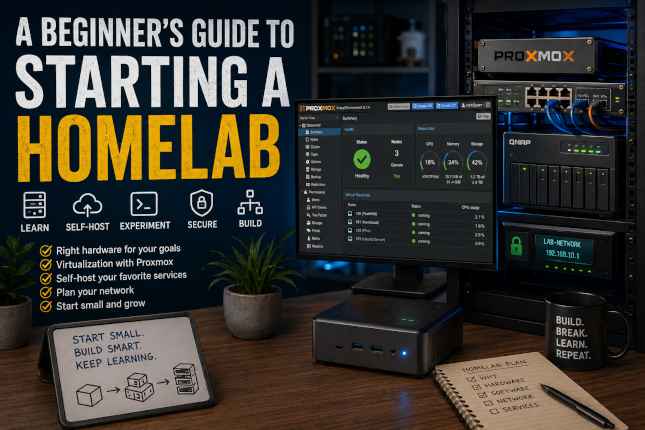
A Beginner's Guide to Starting a Homelab
Every homelab starts the same way: someone sees a post online — a server rack in someone's basement, a tiny PC quietly running a dozen virtual machines, a self-hosted dashboard full of little icons — and thinks, I want that.
Then the questions show up. What hardware do I actually need? What software should I run? Am I going to break my home network? Is this going to turn into a $3,000 hobby?
I've been down this road, rebuilt it more than once, and torn out hardware I was sure I'd use forever. So consider this the guide I wish someone had handed me before I started — the practical version, not the theoretical one.
Start With "Why," Not "What"
The biggest mistake I see (and made myself) is buying hardware before deciding what it's for. A homelab isn't a single thing — it's whatever you build it to be. So before you spend a dollar, get honest about what's actually pulling you in:
- You want to learn IT skills. Virtualization, networking, Linux, scripting — the kind of hands-on experience that's hard to fake on a resume.
- You want to self-host services. Pulling your photos, files, and media off someone else's cloud and onto hardware you control.
- You want a sandbox. A safe place to break things, test code, or practice security work without risking anything that matters.
- You want to run something fun. A Minecraft server, a retro game emulator, whatever gets you excited to log in after work.
- You want to tinker with networking and security. Firewalls, VLANs, ad-blocking, intrusion detection — the stuff that turns your home network into a real network.
Most homelabbers end up wanting all of the above eventually. But knowing what's pulling you in right now tells you what to buy first, and that's the part that actually saves money.
Pick Hardware That Matches Your Actual Goals (Not Your Wish List)
It's tempting to go straight for a rack full of enterprise gear because it looks the part. Resist that urge until you know you'll use it. Here's how the realistic options stack up:
Mini PCs — small, quiet, and sip power. Great for getting started, running a handful of services, or light virtualization. The trade-off is limited room to expand later, though a cluster of two or three handles more than people expect.
Used enterprise servers — serious horsepower for serious money savings on the used market. They'll run more VMs than you'll know what to do with, but they're also loud and pull real electricity. Fine if you've got a basement or garage where noise and heat aren't an issue; rough if your "datacenter" is a closet next to where you sleep.
Raspberry Pi — cheap, silent, and good enough for lightweight jobs like ad-blocking or a single small app. Don't expect it to carry a full virtualization stack.
A custom build — the most flexible option, and the most expensive if you're not careful. Worth it if you already know you want serious RAM or specific expansion down the line.
If you're not sure, start small. A single mini PC or a repurposed old desktop is enough to learn the fundamentals, and you can always scale up once you know what you actually use.
Software: Pick the Layer, Then Pick the Tool
Homelab software roughly splits into three layers, and most builds eventually touch all three.
Virtualization layer — this is the foundation everything else sits on. Proxmox VE is the popular open-source pick for a reason: it's free, well-documented, and has a massive community behind it. VMware ESXi and XCP-ng are the other names you'll run into, each with their own licensing trade-offs.
Operating systems for self-hosting — Ubuntu Server and Debian are the two you'll see recommended endlessly, and for good reason: stable, well-documented, and almost every self-hosted app's install guide assumes you're using one of them. If you're coming from a Windows background, Windows Server is a perfectly valid choice too — there's no rule that says a homelab has to be all-Linux.
Networking and security tools — pfSense or OPNsense if you want a real firewall doing real work, Pi-hole if you just want ads gone across your whole network without much fuss.
Don't feel obligated to pick the "best" tool in each category. Pick the one with documentation that makes sense to you — you'll be staring at it at 11pm trying to fix something, and familiarity beats features every time.
Don't Skip the Network Plan
This is the step people skip and then regret. A homelab isn't just a server sitting in the corner — it's a server talking to your router, your switch, and everything else on your network. A little planning up front saves a lot of head-scratching later:
- A dedicated firewall (even a software one like pfSense) gives you real visibility and control instead of relying on whatever your ISP's router happens to offer.
- A managed switch lets you segment traffic with VLANs once your lab grows past "one box doing one thing."
- Static IPs for your core services mean you're not chasing down a different address every time something reboots.
You don't need all of this on day one. But know it's coming, so your setup doesn't fight you when you get there.
Start Small, On Purpose
Here's the part nobody wants to hear: the homelab in your head — fully racked, redundant, running twenty services — is not where you should start. It's where you end up, eventually, after a lot of small decisions made one at a time.
Pick one or two services first. A few good starting points:
- A file server (TrueNAS is a popular, friendly entry point)
- A self-hosted cloud storage app like Nextcloud
- A media server like Plex or Jellyfin
Live with that for a while. Learn how it behaves, how you maintain it, what breaks and why. Then add the next thing. Homelabs built one deliberate piece at a time tend to stay running. Homelabs built in one weekend tend to get abandoned in a month.
It's Allowed to Be Imperfect
One last thing worth saying: your homelab doesn't need to look like anyone else's. Some people chase silence and power efficiency. Some people chase raw horsepower and don't care about the electricity bill. Some people just want one box quietly backing up family photos. All of these are "real" homelabs.
The only wrong way to start is waiting until you've planned the perfect setup. Buy or repurpose something modest, get one service running, and let the rest follow from there. That's how every homelab — including mine — actually got built.
As always, if you have questions or want help getting any of these set up, reach out through the Need Help? page.
#Homelab #SelfHosting #Proxmox #Virtualization #HomeServer #TechTips #ITSkills #MiniPC #Linux #Networking


